Thursday, 19 February 2015

slow shutter speed ( rough draft!! )

10 second timer/10 second exposure + flash 

10 second timer/10 second exposure no flash

10 second timer/10 second exposure + flash

10 second timer/10 second exposure + flash

10 second timer/10 second exposure + flash

fast shutter speed ( rough draft!! )

1/60th 400 ISO

1/80th 12800 ISO

1/30th 400 ISO

1/80th 400 ISO

1/250th 1250 ISO

Friday, 6 June 2014

{ lighting examples }


 hatchet/side lighting.
to achieve this lighting you place the light source directly to the side of your shooting subject.


tutorial;  http://www.youtube.com/watch?v=4YoqyMUnNKs

                                                                rembrant lighting.
                                               to achieve this lighting, you put your     light source a little off to the side of your shooting subject, to cast a shadow on your subject.


 tutorial;  http://www.youtube.com/watch?v=yEBBGsoQLjU                                                                             


  butterfly/glamour lighting.
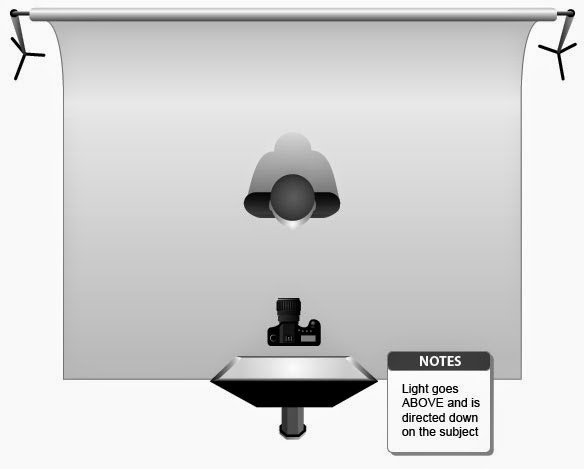
to achieve this lighting all you need to do is put the light directly in front of your subject, who should be directly in front of the camera.


tutorial; http://www.youtube.com/watch?v=z_mXJia_OEI 


Friday, 23 May 2014

{ cross processing attempt }


                         here is my failed attempt at cross processing using photo shop

Wednesday, 21 May 2014

{ cross processing }


cross processing ;  is the deliberate processing of photographic film in a chemical solution intended for a different type of film

i like this picture because it shows you different types of cross processing .
i like the angle of this picture and i also like the cross processing because i think it adds to the picture.

i like this picture because i think the cross processing is really pretty and it reminds me of a edit i would put on my instagram photos.


i think im going to try different types of photos ( landscape, portrait, rule of thirds etc ) and see which ones i like the best after cross processing.

Wednesday, 7 May 2014

{ print scans assignment }


                                                             scans of our "in pairs" print
1.
i chose to make these prints because I feel like they turned out the best, the may not have been the coolest, but I thought they'd produce good results. I chose these prints to scan because they're the only 2 prints I made ha


2.
contact sheet review; I think I made my contact sheet a teensie weensie bit too dark, and too fix that I would just make it a shorter exposure time.


3.
I really enjoyed this project. I felt like it went really smooth and easily. nothing major went wrong.. in the end I wasn't really happy with the results but there's nothing I could do about it..
overall I think it went WAAAY better than my last attempt at film photography.

Wednesday, 23 April 2014

{ double exposure examples }


            i chose these pictures because i feel like its telling a story,the girls expression matches up with the picture and i think these are really pretty scenes in the back ground. .

Thursday, 10 April 2014

{ photo essay }


Acetone – found in nail polish remover

Acetic Acid –  an ingredient in hair dye

Ammonia – a common household cleaner

Arsenic – used in rat poison

Benzene – found in rubber cement

Butane – used in lighter fluid

Cadmium – active component in battery acid

Carbon Monoxide – released in car exhaust fumes

Formaldehyde – embalming fluid

Hexamine – found in barbecue lighter fluid

Lead – used in batteries

Naphthalene – an ingredient in moth balls

Methanol – a main component in rocket fuel

Nicotine – used as insecticide

Tar – material for paving roads

Toluene - used to manufacture paint


Tuesday, 8 April 2014

{ lens vocab }

  1. What is a prime lens? a lens with only one focal length. (cant zoom)
  2. What is a zoom lens? gives you the option of zooming in or out.
  3. When looking through a telephoto lens does the object appear closer or further? closer
  4. Describe an example of when you would use a wideangle lens? in a landscaping scene or trying to photograph a lot of people.
  5. When would you use a Macro Lens? for close up pictures with detail.
  6. If you want a Macro effect but DO NOT have a macro lens, what is another option? use the macro switch on your camera. or turn your lens around. must be in manual and adjust your shutter speed.

    For each lens describe: 
a)When is the best situation to use the lens


b)What is the effect of the lens

Sigma Superwide 8-16mm:
a) landscape.
b)interesting circular effect.

 24mm:

a)no zoom.
b)used for  wide angle.

 50mm:

a)standard lens (anytime really) or low light situations.
b)what I see.

 60mm MACRO:

a)close up detailed pictures. (bug pictures etc.)
b)close up photography.

 85mm:

a)portraits.
b)really good portrait lens allows photographer to have distance from subject, really nice jobs at blurring out background.

 Lensbaby Lens:

a)a creative photo.
b)a creative interesting photography that changes how you see a scene.

 80-200mm:

a)spying on someone,  far to closer action shots.
b)telephoto, when you want to bring the action closer, zoom.

Wednesday, 2 April 2014

{ photo essay planning assignment }


   what is your environmental concern?
My environmental concern is the damage cigarettes and the butts of them do, and how it affects us.


  why is it important to me?
At first it was pretty much the only thing I could think of so I just thought whatever, but as I started researching about it,  more and more interested in the topic. now, its disgusting to see what these cigarette butts are doing to the world, so I want to see a change.


 list 5 ways or more that it negatively affects the environment
one)
 Researcher Helmut Geist has determined that 200,000 hectares of forests are cut down for tobacco farming each year. this deforestation mainly occurs in the developing world and accounts for 2-4% of all global deforestation.


two)
Smoking worldwide releases about 2.6 billion kilograms of carbon dioxide in the air every year. It also releases about 5.2 billion kilograms of methane every year.
three)
Although the global share of agricultural land used for tobacco growing is less than 1%, its impact on global deforestation is 2-4%, making a visible footprint for climate change.
four)
Cigarettes discarded irresponsibly are a common cause of forest fires worldwide. Experts estimate that smokers who don't extinguish their cigarettes properly cause 10% of all forest fires.
five)

It has been estimated that 17,000 people worldwide are killed annually by fires caused by cigarettes or cigarette lights, causing property damage in excess of  US$27 billion.

six)
In 2008, during the annual International Coastal Cleanup organized by the Conservancy, over 3.2 million butts were removed from beaches and inland waterways around the world.19 During the 2009 Cleanup, cigarettes and cigarette filters accounted "for nearly twice the number of any other debris item.
seven)
Cigarette butts are not biodegradable. The paper and tobacco in cigarette butts are biodegradable, but filters (most of which are made of cellulose acetate, a form of plastic) are not.
eight)
Montreal has estimated that 3 million cigarette butts are discarded on the ground every day in its downtown.23 Toronto found that cigarette-related litter made up 17% of all small litter found on its streets.24 San Francisco estimates that cleaning up cigarette butts costs the city about $7.5 million a year.

list 5 ways or more that it negatively effects animals or humans
one)
When ingested by children or other living organisms, cigarette butts are poisonous. Poison control centres worldwide report thousands of incidents involving children ingesting cigarette butts annually.
The nicotine in cigarette butts is poisonous and children under six who have ingested them suffer symptoms of "vomiting, nausea, pale,
or flushed appearance, lethargy, and gagging.
two)
Popular pets, such as dogs, are also susceptible to nicotine poisoning and have experienced great discomfort when ingesting cigarette butts.

three)
Second hand smoke causes cancer.
four)
Smoking robs you of some of your good cholesterol.
five)
Smoking temporarily raises your blood pressure.
six)
 Smoking increases the blood’s clotting likelihood.
seven)
Smoking makes it more difficult to exercise.


Monday, 10 March 2014

{ famous photographer fridays 3.0 }


Industriehallen-Industrial-Facades-Bernd-and-Hilla-Becher
todays photographers were an old married couple by the names of Bernd & Hilla Becher.
the Bechers style is an industrial architecture type thing, taking pictures of different styles of the same thing for years at a time. something i find intersting about this photography is how some of their projects took 9 years to finish, i could never wait that long.  here is a piece of work by this married couple


Bernd & Hilla Becher had a lot of inspired people on their hands, but i enjoy Idris Khan's work alot.
Idris was so inspired by the Bechers that he decided to make some of their pieces into his own. to do this Idris took one of their complete projects (such as the one above^) and put them through photoshop and took each individual picture and put them into there own photoshop layer. creating cool photos!
here is one of his creations

{ layers questions }


            how do i create a layer?
          -  click the icon at the bottom right that looks like a piece of paper folded.
           how do i rename a layer?
          - unlock the layer, then you can click twice and rename the layer with ease.
           how do i convert a locked layer to a regular layer?
          - to convert a lockeed layer all you have to do is double click box type thingy and up pops the unlock tab, so just fill that out and your good to go.
           how do i duplicate a layer?
         - to duplicate a layer all you have to do is right click the layer you want to duplicate and choose " duplicate layer ".
           how do i move a layer up or down in the layer stock?
         - to move a layer up or down all you have to do is click the layer and drag it up or down, above or below the other layers.
           how do i select multiple layers at once?
        - to select multiple layers at once all you have to do it hold shift while clicking all the layers you want to select.
           what does control J do?
        -control J takes your selection and moves it on to its own seperate layer.

Wednesday, 26 February 2014

ed burtynsky

today we learned about ed burtynsky..
eds style is kinda of eye opening, he wants people to see his photos and think about what we are doing to the world, polluting, trashing, demolishing, everything. his pictures differ from pollution and trash, to the way people are living, working 10 hour factory days for little to no money.
i see these people having to work on the clock non stop and i couldnt even imagine having to do that.
 this is the photo i chose, i like/chose this photo because its really eye opening and it almost seems unreal.

Wednesday, 19 February 2014

aperture

1.8 aperture

8.0 aperture

16 aperture


                                                             { more photos in file }